Altus Air · by Altus Air Tech LLC

The whole charteroperation.One place.

Altus Air is operations software for Part 135 charter operators. Quote a trip, crew it, release it, follow it, then fix the squawk, book the costs and work the safety report, all on the same record.

Book a demo
DispatchCrew appMaintenanceAccountingSafety
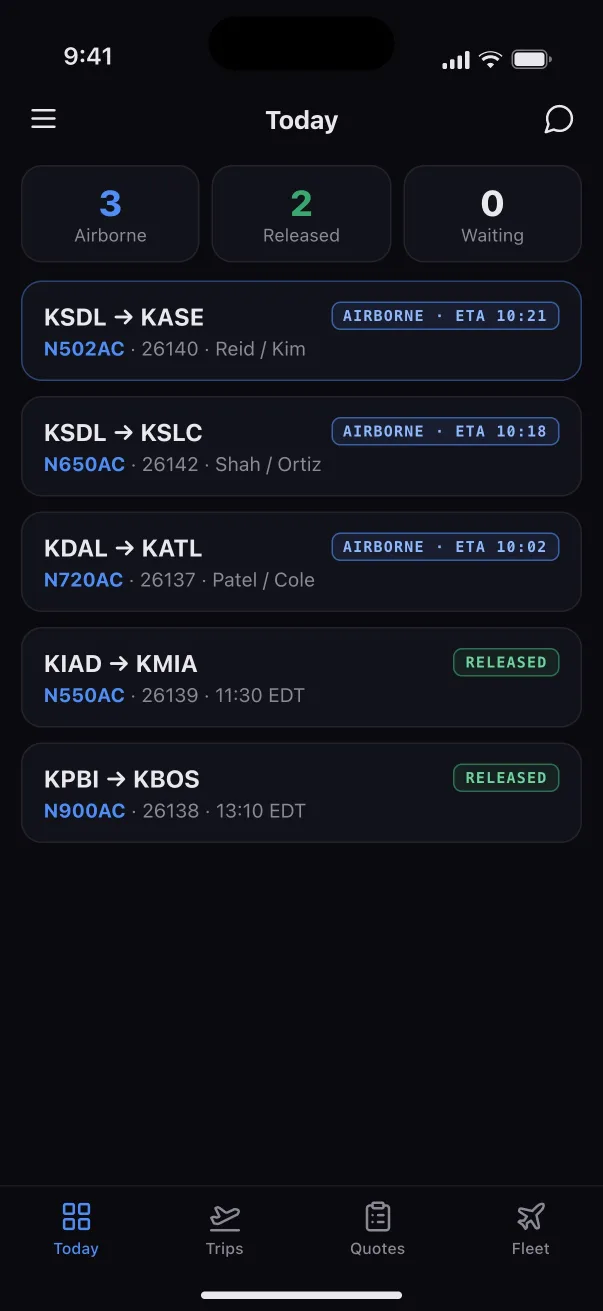
The Altus Air Today board: three aircraft airborne, two released and not yet out, and flight following for every trip of the day, with scheduled and actual out times and ETAs.

The problem

A scheduling vendor, three spreadsheets, a group chat and a binder.

That's how most charter operators still run a trip. Altus Air puts it in one place, where dispatch, crew, maintenance and accounting all read the same record.

How it works

One trip, from quote to closed.

Follow a single charter through Altus Air. Each step picks up where the last one left off. Nothing is retyped and nothing is lost between departments.

01 / 09 Quote

Priced from your rate card.

Pick the legs and the aircraft. Altus Air prices the trip from your own rate card and shows, as you choose, whether that tail is free, whether a crew is available and whether the airport needs a special qualification. The client signs the quote online.

The quote builder: two legs from Scottsdale to Aspen and back, the aircraft picker showing availability and crew, and the pricing column.

02 / 09 Book

Accepted, and on the board.

A signed quote becomes a booked trip in one move. It lands on the Operations Calendar beside every other aircraft, legs color-matched by trip, with maintenance deferrals drawn on the same timeline.

The Operations Calendar: a week of legs for ten aircraft on one timeline.

03 / 09 Crew

Only a legal crew can be assigned.

Assign the PIC and SIC leg by leg. Every pick is checked against flight time, duty and rest, and against takeoff and landing recency, before it saves. When a pilot won't work, Altus Air tells you why.

FAA§135.267 flight, duty & rest · §135.247 recency

Crew assignment for a leg, with one pilot flagged as not legal because of rest before duty.

04 / 09 Release

Nothing flies that shouldn't.

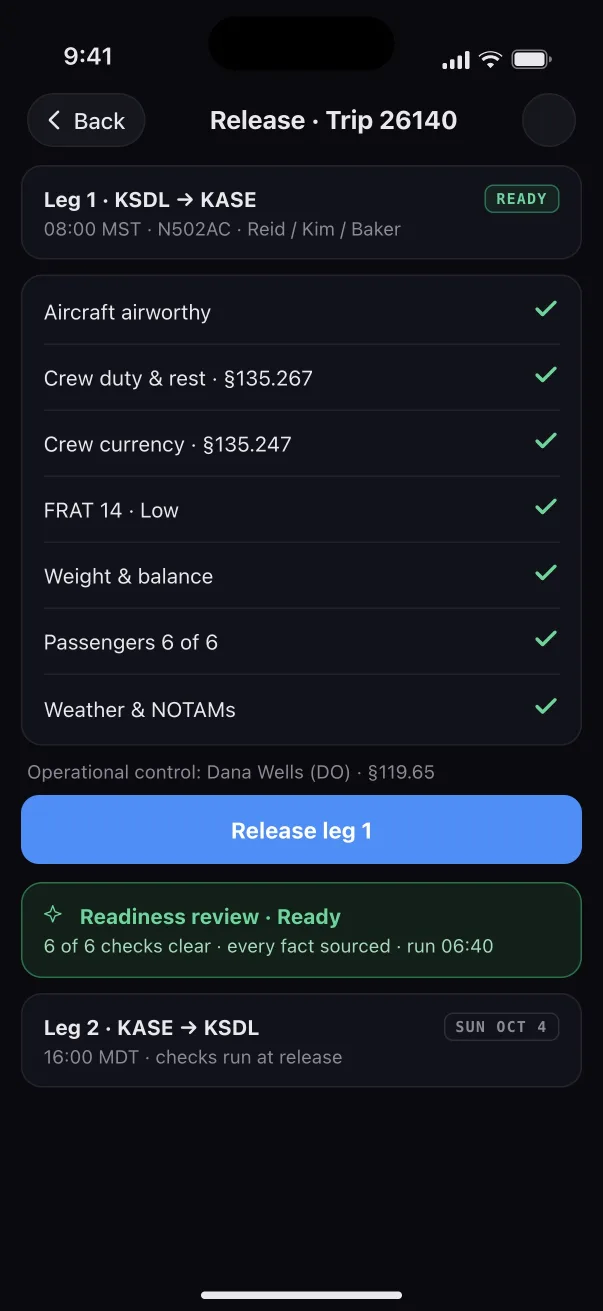
Each leg is released only after its checks pass: aircraft status, crew duty and currency, the flight risk assessment, weight and balance, passengers, weather and NOTAMs. An AI readiness review reads the whole leg and links every finding to the record it came from. The person with operational control releases the leg.

FAA§119.65 operational control · Part 5 FRAT signed before release

The release drawer for leg 1: aircraft status, crew duty and rest, crew currency, flight risk, weight and balance, passengers, and weather and NOTAMs, all checked, with a Release leg 1 button.

05 / 09 Fly

Follow every flight.

Live ADS-B puts every tail on the map. Scheduled and actual times sit side by side, each trip has its flight followers, and crew and dispatch share a message thread for the trip.

The Fleet Map with aircraft positions from ADS-B.

06 / 09 After landing

Actual times, straight from the crew.

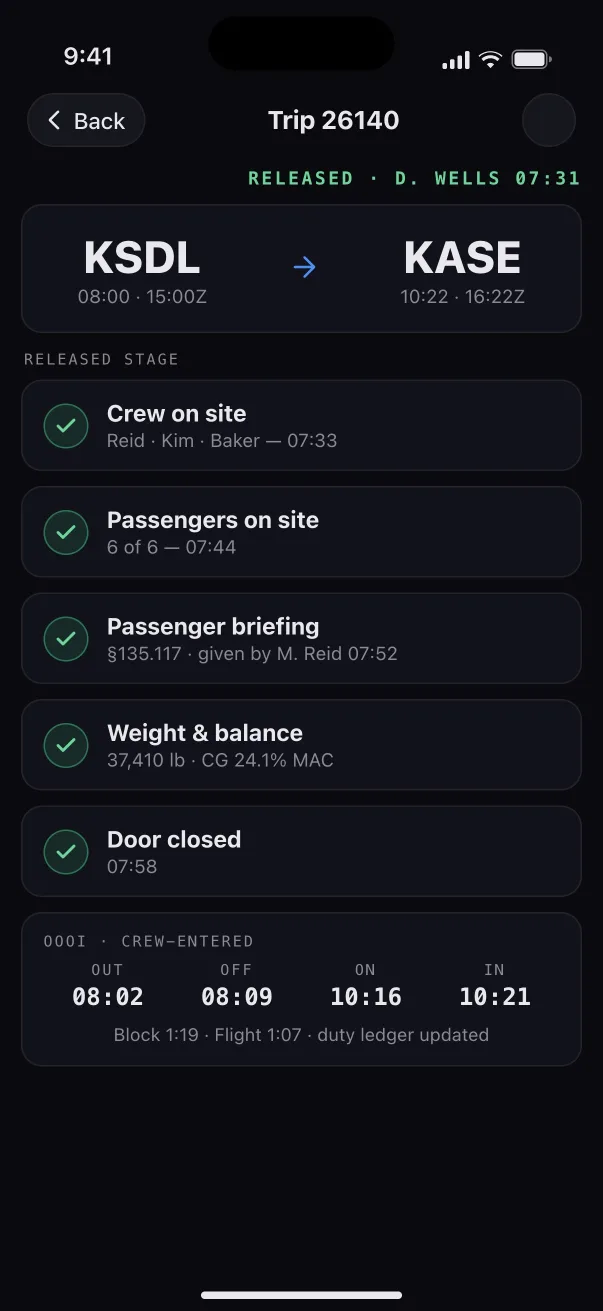
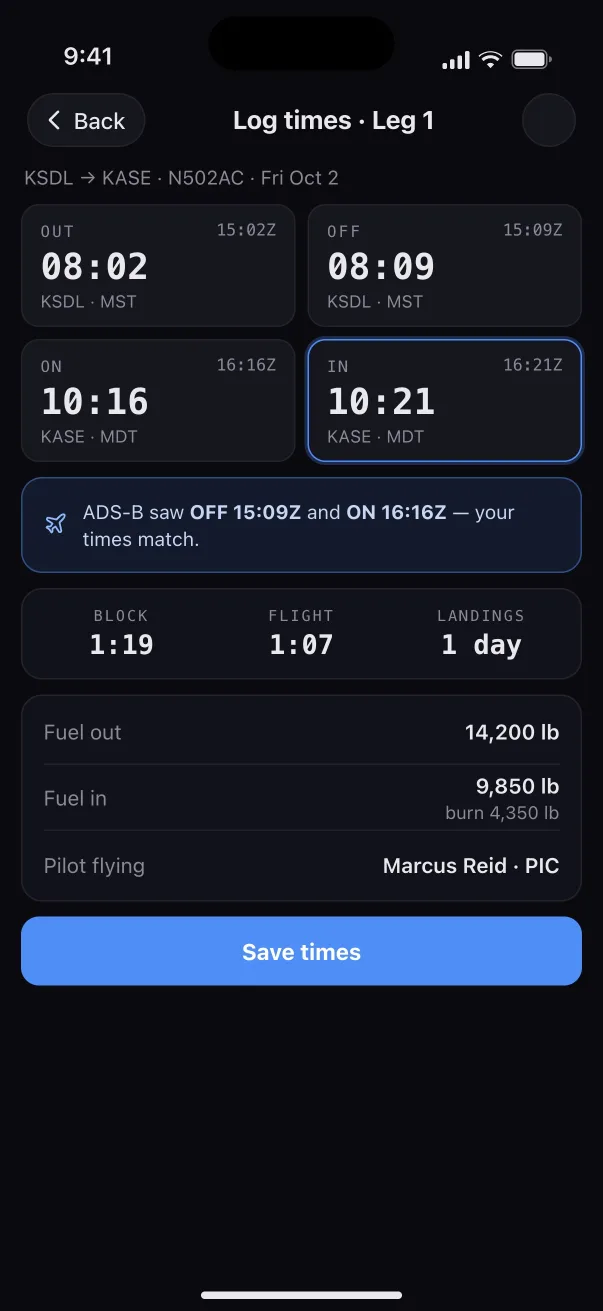
Pilots log out, off, on and in from their phone, and ADS-B confirms the times. Block time, flight time, duty and currency then update without anyone typing them in again. The trip closes itself when the last leg is done.

FAA§135.267 duty ledger from the crew's own times

A trip's actuals: out, off, on and in times for both legs, confirmed against ADS-B.

07 / 09 Maintenance

A squawk grounds the tail, and the fix is signed.

A discrepancy the crew files after landing becomes a maintenance event. Raise the work order, order the part, defer the item against the aircraft's own FAA-approved MEL, and sign the work in the app or with a QR code on a phone. The release won't let a grounded tail go.

FAA§43.9 signed record entries · MEL deferrals

A work order with its tasks, parts and signatures.

08 / 09 Accounting

Every cost in one ledger, and in QuickBooks.

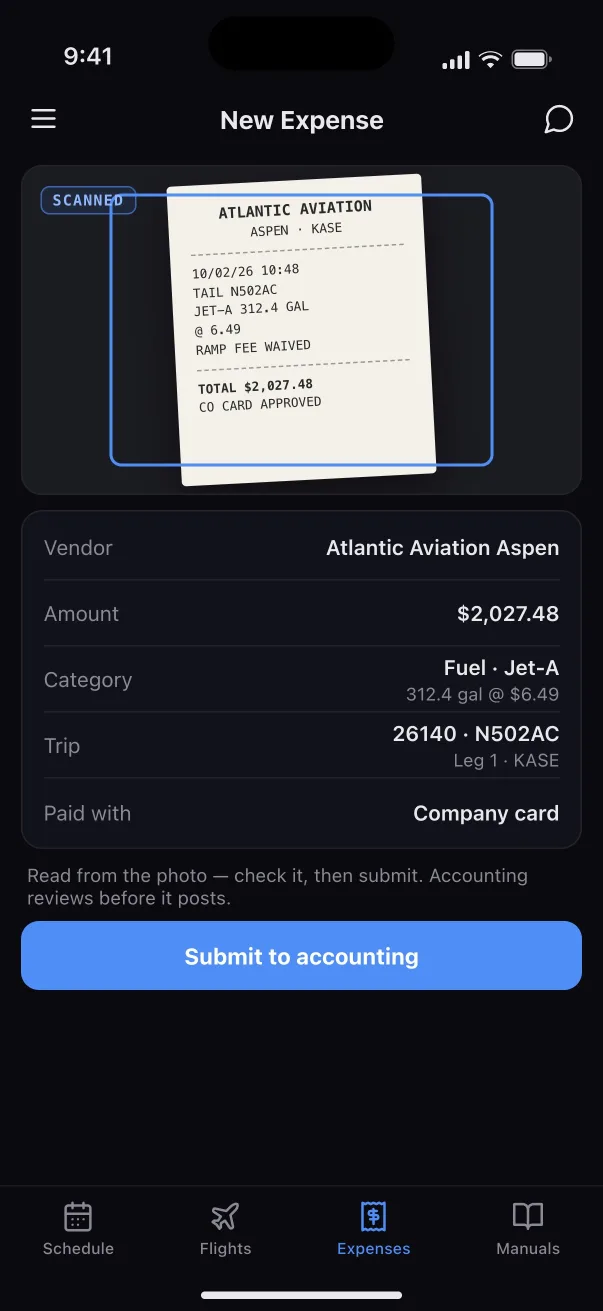
Receipts scanned by the crew, expenses from dispatch, purchase orders from maintenance and fuel uplifts all land in one Inbox. Someone reviews each item, confirms it with one keystroke, and it posts to the QuickBooks company you already use. Every trip shows its margin against the quote.

The accounting Inbox: a scanned fuel receipt with its fields read and ready to review.

09 / 09 Safety

Anyone can report. The system does the paperwork.

Crew, staff and outside parties can file a safety concern at any time. The Safety Manager triages it, sees the leg's whole record, assesses the risk before and after controls, assigns corrective actions and closes it with a lesson learned.

FAAPart 5 SMS · §5.71 · §5.93

A safety issue with its risk matrix, initial and residual, and corrective actions.

The product

Every side of the operation. Watch each one work.

Each module works on its own and gets better alongside the others. Press play for a one-minute walkthrough.

Dispatch & scheduling

Quote, book, crew, release, follow.

The dispatcher's day in one place: rate-card quotes, the aircraft calendar, legal-crew assignment, per-leg release checks and live flight following.

Pilots & crew

The trip finds the pilot.

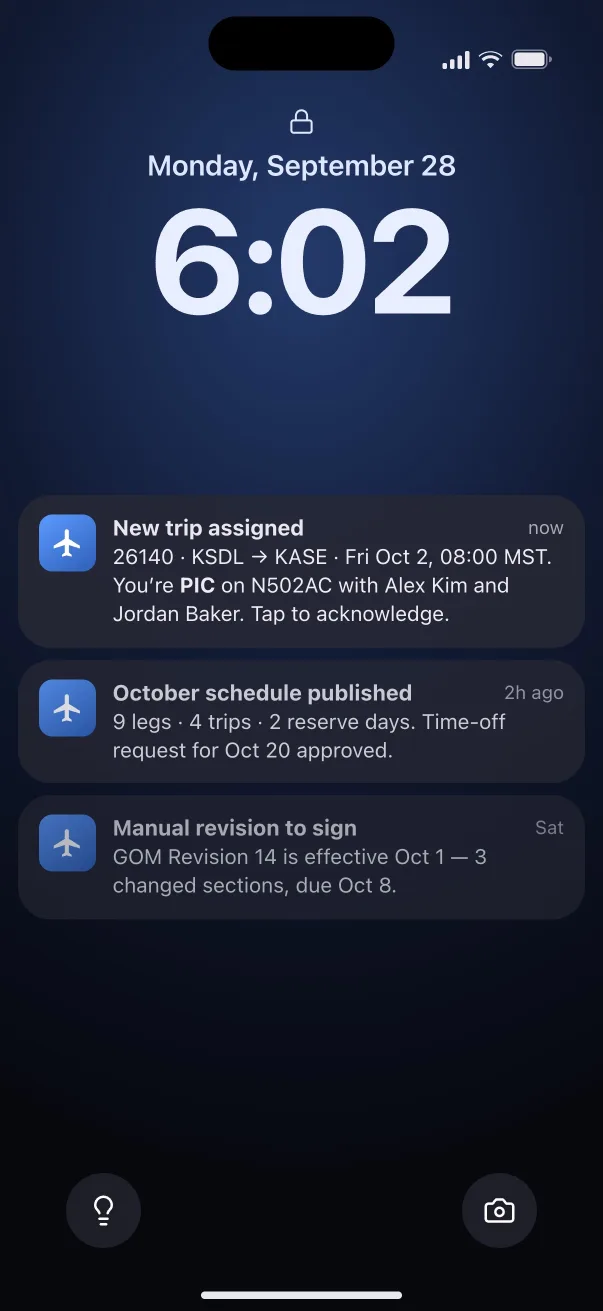
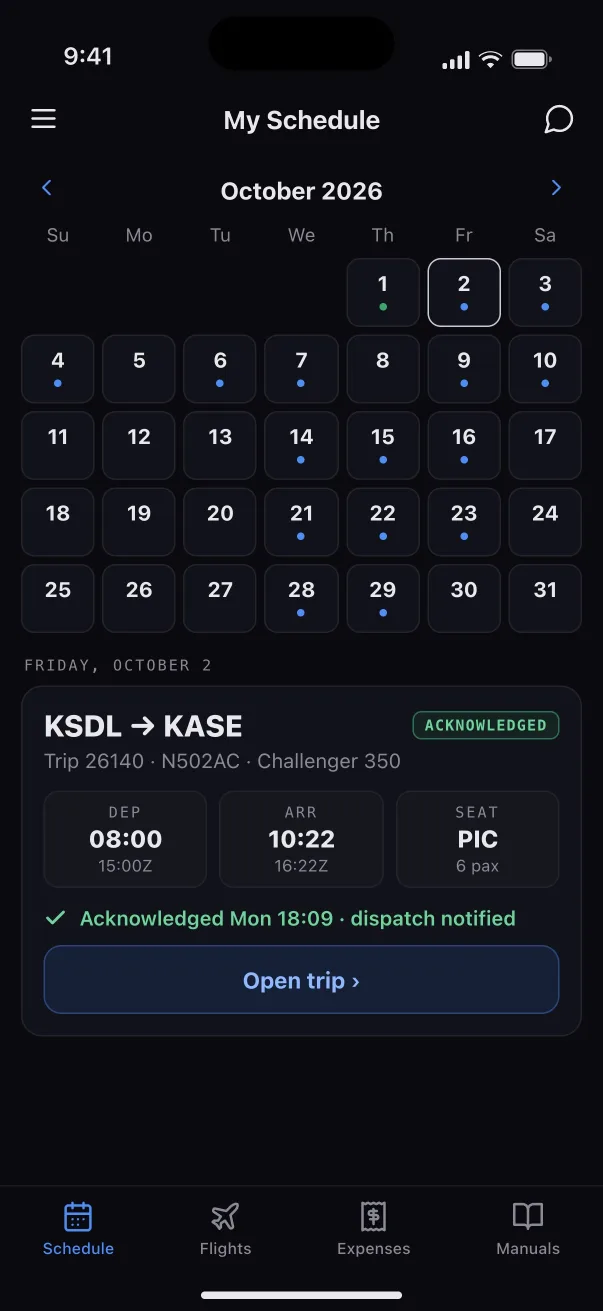
A push notification, one-tap acknowledgment, the trip sheet, the risk brief and the FRAT. Then four times logged and the rest done for them.

Maintenance

Squawk to signed.

Events, work orders, parts, MEL deferrals, inspections due and signed returns to service. Integrated with CAMP.

Accounting

Every side files it. One ledger keeps it.

One Inbox, reviewed by a person, posted to your QuickBooks. Bills, income, trip margins and owner statements.

Safety (SMS)

A Part 5 SMS you actually run.

Reports, triage, risk before and after controls, corrective actions, lessons learned and safety meetings.

Operations Copilot

Ask your own manuals.

Crew and dispatch ask a question in plain English and get an answer from your GOM and your records, with the section and page it came from, so they can check it before they act on it.

What are our limits for landing at KASE?
✦ Operations CopilotKASE is a special airport in our GOM. Arrivals are day only, the PIC must hold the KASE qualification, and the crosswind limit is 15 kt dry / 10 kt wet.GOM §4.3.2 · p. 4-18GOM §4.3.5
Product tour Click through the screens behind every module: dispatch, the crew app, maintenance, accounting, safety and the Copilot. Take the tour

The mobile app

One app. Three sides.

The same app opens to whatever the person does: the pilot's schedule, the dispatcher's release queue, the mechanic's work. Everyone sees the same trip, each from their own side.

CrewMy Schedule, trip sheets, the FRAT, OOOI times, receipts, safety reports and the manuals, with the Copilot one tap away.
OpsToday's trips, releases from the phone, the fleet on a map and the calendar.
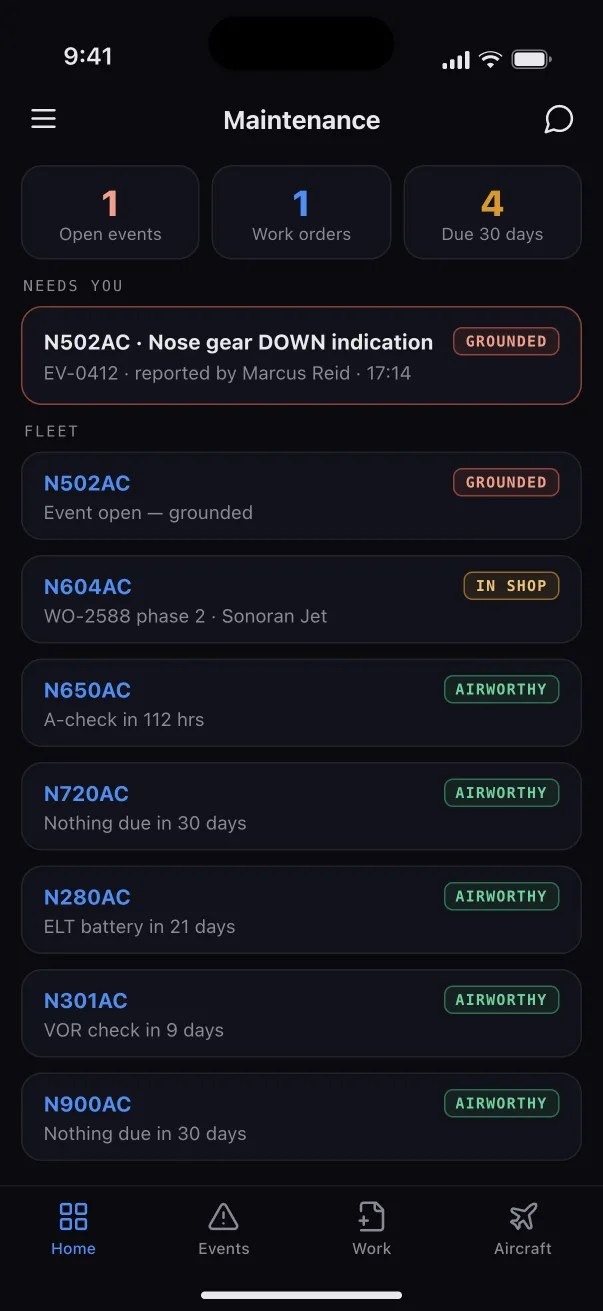
MaintenanceThe fleet's queue, events and work orders, and signing a task on the spot.
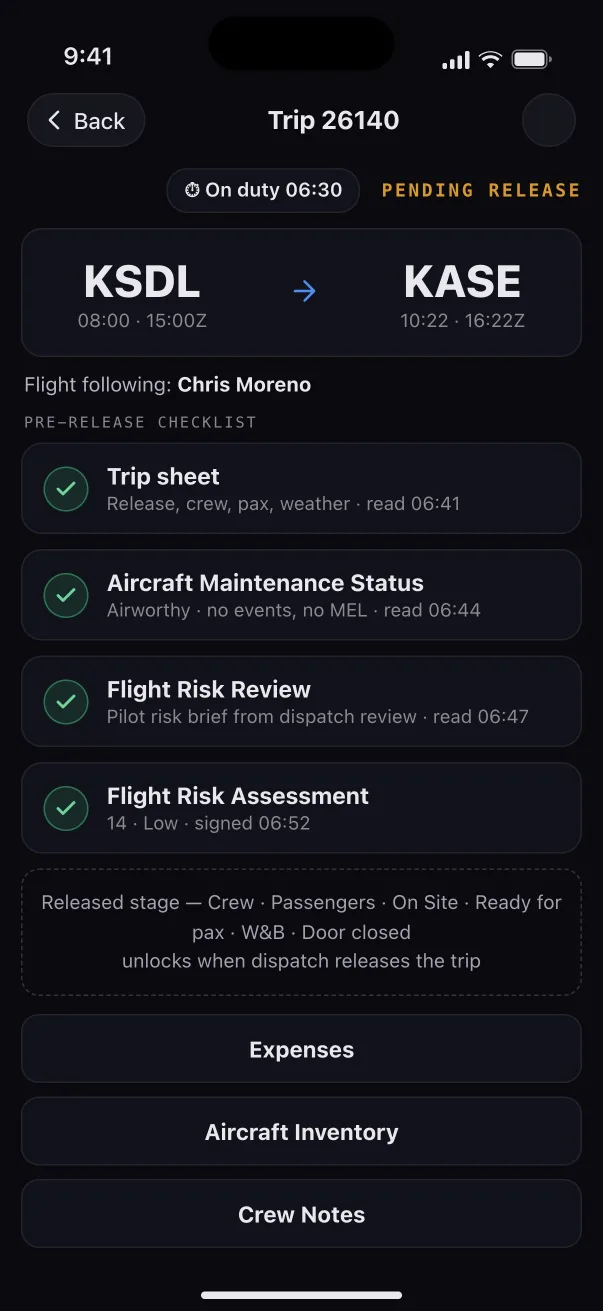
Crew app: the pre-release checklist for a leg, with the trip sheet, maintenance status, risk review and FRAT all read.
Crew
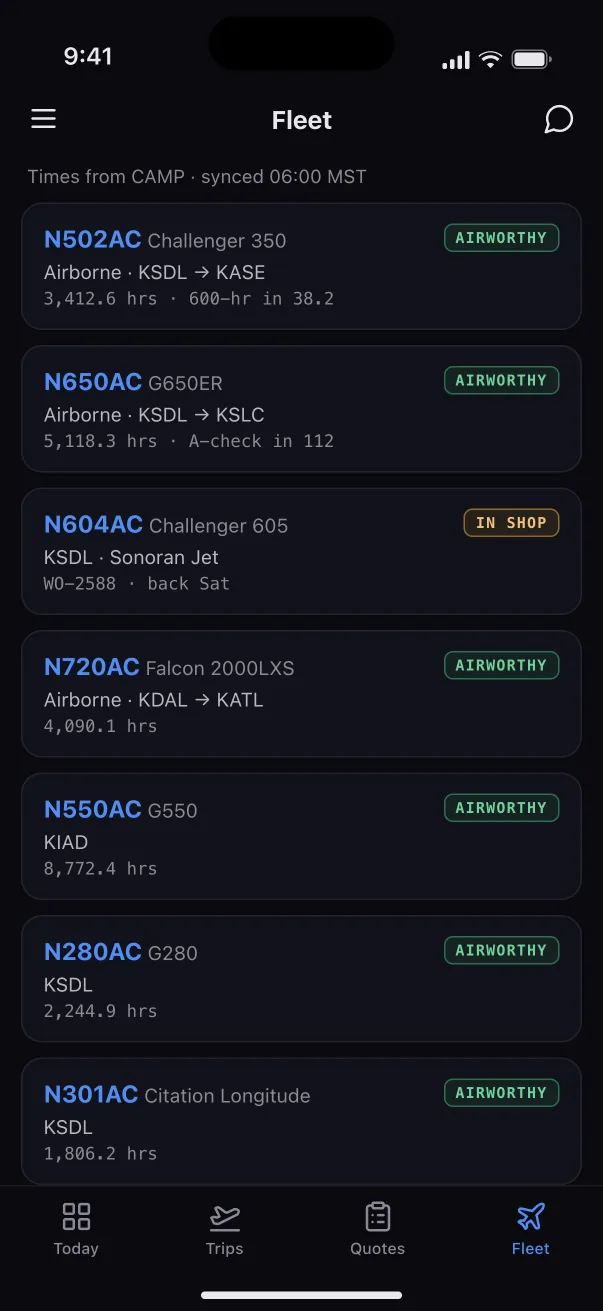
Ops app: the fleet, each tail with its status, hours and next inspection.
Ops
Maintenance app: the queue, with a grounded tail at the top.
Maintenance

Built for Part 135

The rules aren't a report you run later. They're checked before anyone can save.

Altus Air checks each assignment, release and signature against the regulation behind it, and the record keeps itself.

§135.267Flight time, duty and rest, computed from the crew's own logged times.
§135.247Takeoff and landing recency, tracked for every pilot on every pick.
§119.65Operational control named on every trip, and only that person releases it.
§135.117The passenger briefing, given and logged with who gave it.
Part 5A flight risk assessment signed before every release, and an SMS you run from report to lesson learned.
§43.9Signed maintenance record entries, composed from the work itself.
MELDeferrals picked from the aircraft's own FAA-approved MEL, with the clock on the calendar.
§91.171VOR checks and inspection limits tracked. A tail past a limit grounds itself.
AC 120-78B Every signature is made from the signer's own account, sealed with the operator's digital seal, locked into its PDF, and checkable by anyone holding its code. How signing works

Where it comes from

Built at Exjet

Altus Air wasn't designed in a conference room. It was built inside Exjet, a working Part 135 charter operator, and Exjet runs on it today. Every feature started as a problem on a real trip.

Built at Exjet · Made by Altus Air Tech LLC

Your data

Your operation, in your own workspace.

Altus Air is used by the operator's own staff: dispatchers, the Director of Operations, crew, mechanics and accounting. Each operator's workspace is separate from every other operator's.

A workspace of your own

Your trips, crew, aircraft and records are kept apart from every other operator's, and your staff see only your operation.

Keeps your QuickBooks

Accounting posts to the QuickBooks company you already have. Your books stay where your accountant expects them.

Mail from your own address

Quotes, itineraries and invoices can go out from your company's own mailbox. Connecting one is optional.

We ask before we look

No one at Altus opens your clients', passengers' or crew's details without your admin's approval, and you see every access in your own log. How it works

Why Altus Air asks for access to your Google account

An operator can connect its own Google Workspace or Gmail mailbox to Altus Air. This is optional. Each connection is made by someone at the operator, for one purpose, and can be disconnected at any time from Settings → Integrations in the app or from your Google account's security settings.

Sending from your own mailbox

Quotes, itineraries, invoices and crew notices that your staff create in Altus Air are sent from your company's own address, and a copy lands in that mailbox's Sent folder.

Permission: gmail.send. It lets Altus Air send mail. It does not let Altus Air read the mailbox.

Reading a mailbox you choose

Invoice inbox: vendor invoices in a Gmail label you pick are imported into Accounting as draft bills for your staff to review. Altus Air adds an "AP/Imported" label to each message it has imported and makes no other change.

Fuel price inbox: fuel price sheets from your fuel vendors are imported into your fuel pricing.

Permissions: gmail.modify for the invoice inbox (for the label) and gmail.readonly for the fuel inbox.

Every connection also asks for userinfo.email so the app can show which address is connected. Google user data is used only to provide these features. It is never sold, never used for advertising, and never used to train AI models. The details are in our privacy policy.

Cleared for takeoff

See it run your own trips.

We'll walk your team through Altus Air on a trip like one of yours, from the quote to the closed ledger.

or write to dev@altusairtech.com

Altus Air

Shown with a fictional operator, Acme Air. No real passenger, crew or customer data.